
Using UbiSim’s Intuitive Editor To Address Clinical Gaps
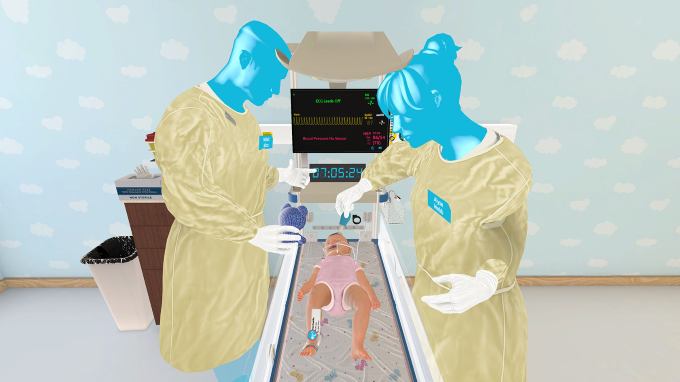
Table of Contents
Name of the heading 1
1- Start your table with the syntax {start-table}
2 - Add an H3 Heading to create a new column (this will be the column title)
3 - List cells as bullet points in a List element
4 - End your table with the syntax {end-table}
UbiSim helps nursing educators ensure students have consistent opportunities to care for patients with a variety of conditions and clinical presentations, including those they may not encounter during traditional clinical rotations, while reinforcing key course objectives. Clinical experiences differ from one learner to the next (Hannula et al., 2025). Pediatric and obstetric placements are especially challenging to coordinate, and even learners caring for similar patients see differences in acuity, diagnoses, and level of participation. With UbiSim’s Scenario Catalog of ready-to-use VR scenarios and the Intuitive Editor, educators can target the specific clinical gaps in their programs so learners can reinforce classroom instruction before, during, or after their rotations.
Six UbiSim Scenarios to Address Clinical Gaps
Each example below pairs a scenario from the Scenario Catalog with ways to adapt it in the Editor, so one scenario can support several learning objectives.
Pediatrics: Prepare Students for More Than One Patient Presentation
Learners assess a six-year-old presenting with an acute asthma exacerbation, prioritize nursing interventions, provide age-appropriate support, and communicate findings to the provider using SBAR.
Use the Editor to: adapt the setting or learning objectives to emphasize patient and family education before discharge, or build a variation centered on recognizing worsening respiratory status and escalating care. These variations give students opportunities to practice respiratory assessment, clinical prioritization, and communication in situations they may not encounter during every pediatric rotation.
2. Pediatric Acute Abdominal Pain
Learners assess a child experiencing abdominal pain, prioritize interventions, communicate with the patient and family, and report findings to the provider.
Use the Editor to: customize different causes of abdominal pain. Small adjustments highlight the assessment findings associated with each cause. This works especially well in a peer-to-peer setting where learners care for similar patients but must interpret the findings on their own to determine the most likely cause of the pain. It allows learners to have the same objectives while still using their own clinical judgment to care for the patient. Learners practice distinguishing relevant findings, recognizing when additional evaluation is needed, and communicating concerns before a diagnosis is established, which moves them beyond memorized responses toward individualized clinical reasoning.
Obstetrics: Build Confidence With Less Predictable Clinical Situations
3. GBS Infection: Management of Labor
In a labor and delivery setting, learners perform an antepartum assessment, implement evidence-based interventions for group B streptococcus infection, assess safety considerations, and communicate maternal and fetal status.
Use the Editor to: modify maternal vital signs, assessment findings, or fetal heart rate to introduce new concerns during labor. Learners must recognize changes in maternal or fetal status, decide which findings need immediate attention, and escalate to the healthcare team. This extends the learning objectives beyond GBS management to include fetal monitoring, prioritization, and timely intervention as a patient’s condition changes throughout labor.
Learners assess a pregnant patient with hyperemesis gravidarum, implement nursing interventions, communicate findings using SBAR, and provide patient education and support.
Use the Editor to: adjust assessment findings, vital signs, and symptom history to create different levels of severity. One version could feature persistent nausea and vomiting with early signs of dehydration. Another could present worsening symptoms, tachycardia, orthostatic changes, and concerns about electrolyte imbalance. Learners interpret the findings, prioritize interventions, and recognize when the patient’s condition requires escalation. Working through similar presentations at different acuity levels helps learners recognize subtle changes and respond to the patient in front of them instead of following a memorized sequence.
Mental Health: Practice Communication in Sensitive Situations
In an outpatient mental health setting, learners perform a mental status examination, using therapeutic communication to assess the patient’s behavior, mood, and thought processes while providing nursing care and patient education.
Use the Editor to: adapt the scenario to explore other mental health presentations, such as anxiety, depression, PTSD, or symptoms associated with bipolar disorder. Adjusting the patient’s history, behaviors, and responses gives learners practice with different assessment techniques and communication strategies. Each variation challenges learners to recognize changes in mood and behavior, gather relevant information, and identify potential safety concerns.
Medical-Surgical: Reinforce Recognition of High-Acuity Conditions
6. Acute Myocardial Infarction and Coronary Artery Disease: Assessment
Part 1: Acute Myocardial Infarction. Learners care for a patient with new-onset chest pain radiating to the jaw. They perform a focused assessment, prioritize interventions, recognize concerning findings, and communicate with the healthcare team using SBAR.
Part 2: Coronary Artery Disease: Assessment. Learners then assess the same patient with coronary artery disease, reinforcing cardiovascular assessment, patient education, and communication about ongoing cardiac health.
Use the Editor to: connect the two scenarios into a progressive learning experience that moves from the acute event into ongoing cardiovascular management. The coronary artery disease scenario can be adapted to focus on post-MI recovery, medication education, risk-factor modification, and recognizing symptoms that warrant further evaluation. Adjusting the patient’s history and findings can also reinforce the link between coronary artery disease and future cardiac risk. Educators can tailor these adjustments to their learning objectives or use them for remediation.
Pairing these scenarios connects emergency cardiac care with ongoing patient management across the patient’s care journey.
Using UbiSim's Editor to Turn One Scenario Into Multiple Learning Experiences
By adjusting patient presentations, assessment priorities, care settings, and other scenario elements, educators can extend a scenario well beyond its original learning objectives. The Scenario Catalog provides the starting point, and the Editor tailors each experience to the curriculum and the learners. When no existing scenario fits a learning objective, educators can build a new one.
Every UbiSim scenario includes a prebrief, scenario, and debrief, supporting a structured approach to simulation-based learning aligned with the INACSL Healthcare Simulation Standards of Best Practice.
Closing the Gap Between Clinical and Classroom Using VR Simulation
Clinical experiences will always vary, and educators cannot control every patient, diagnosis, or learning opportunity a student encounters. They can, however, be intentional about how students prepare for clinical practice and how classroom concepts are reinforced through simulation.
By connecting didactic instruction, VR simulation, and clinical experiences, educators can provide additional opportunities for students to apply knowledge, practice decision-making, and develop clinical judgment.
UbiSim helps educators make those opportunities more intentional. The goal isn't to replace clinical placements. It's to supplement them with meaningful learning experiences, so students can practice important concepts even when the clinical environment doesn't provide the same experience to every student.

Give your learners hands-on clinical simulation training that builds confidence, improves decision-making, and prepares them for real-world patient care in a safe, scalable virtual environment.
FAQs
Heading 1
Heading 2
Heading 3
Heading 4
Heading 5
Heading 6
Lorem ipsum dolor sit amet, consectetur adipiscing elit, sed do eiusmod tempor incididunt ut labore et dolore magna aliqua. Ut enim ad minim veniam, quis nostrud exercitation ullamco laboris nisi ut aliquip ex ea commodo consequat. Duis aute irure dolor in reprehenderit in voluptate velit esse cillum dolore eu fugiat nulla pariatur.
Block quote
Ordered list
- Item 1
- Item 2
- Item 3
Unordered list
- Item A
- Item B
- Item C
Bold text
Emphasis
Superscript
Subscript
The Scenario Catalog includes scenarios for patients across the lifespan, including pediatrics, obstetrics, mental health, and medical-surgical care. Educators can use a scenario as is or adapt it in the Editor for different learner levels, from simpler presentations for beginners to subtle or overlapping symptoms for advanced learners.
The UbiSim Editor requires no coding. Educators who can type and use drag-and-drop can build or modify a scenario in a few clicks, choosing patient characteristics, clinical presentation, dialogue, medications, equipment, and provider orders.
Yes. Every UbiSim scenario includes a built-in pre-brief and debrief, supporting a structured approach to simulation aligned with the INACSL Healthcare Simulation Standards of Best Practice. Educators can also edit the prebrief and debrief content in the Editor to match their learning objectives.



Hayley Conner, Ed.D, MSN, RN, is a registered nurse and nursing educator with experience teaching in RN and LPN programs across classroom, simulation, clinical, and laboratory settings. She holds a master's degree in Nursing Education and a doctorate in Higher Education Leadership. Hayley works with UbiSim customers to support VR implementation. She is passionate about advancing innovative approaches that strengthen nursing education and student readiness for practice.
Explore more
Teaching Clinical Judgment With UbiSim Multiplayer VR
Teach nursing learners to communicate when someone else is in the room, with pre-brief, role, and debrief tips for multiplayer VR simulation.

What a UbiSim VR Simulation Partnership Looks Like
From picking VR software to building faculty confidence, here's what a real clinical partnership with UbiSim looks like, from a nurse who lives it daily.
The Benefits of AI Patient Dialogue in VR Nursing Simulation
AI patient dialogue brings real conversation practice to VR nursing simulation, building learner confidence and empathy while helping programs scale smarter